
I'm working on a personal information firehose to triage and prioritize inbound messages. This post is what I've learned from using an early prototype to do all my email triage for the last two weeks.
The inbox
I call the project Firehose. The user-facing UI for this project is a minimalist inbox.
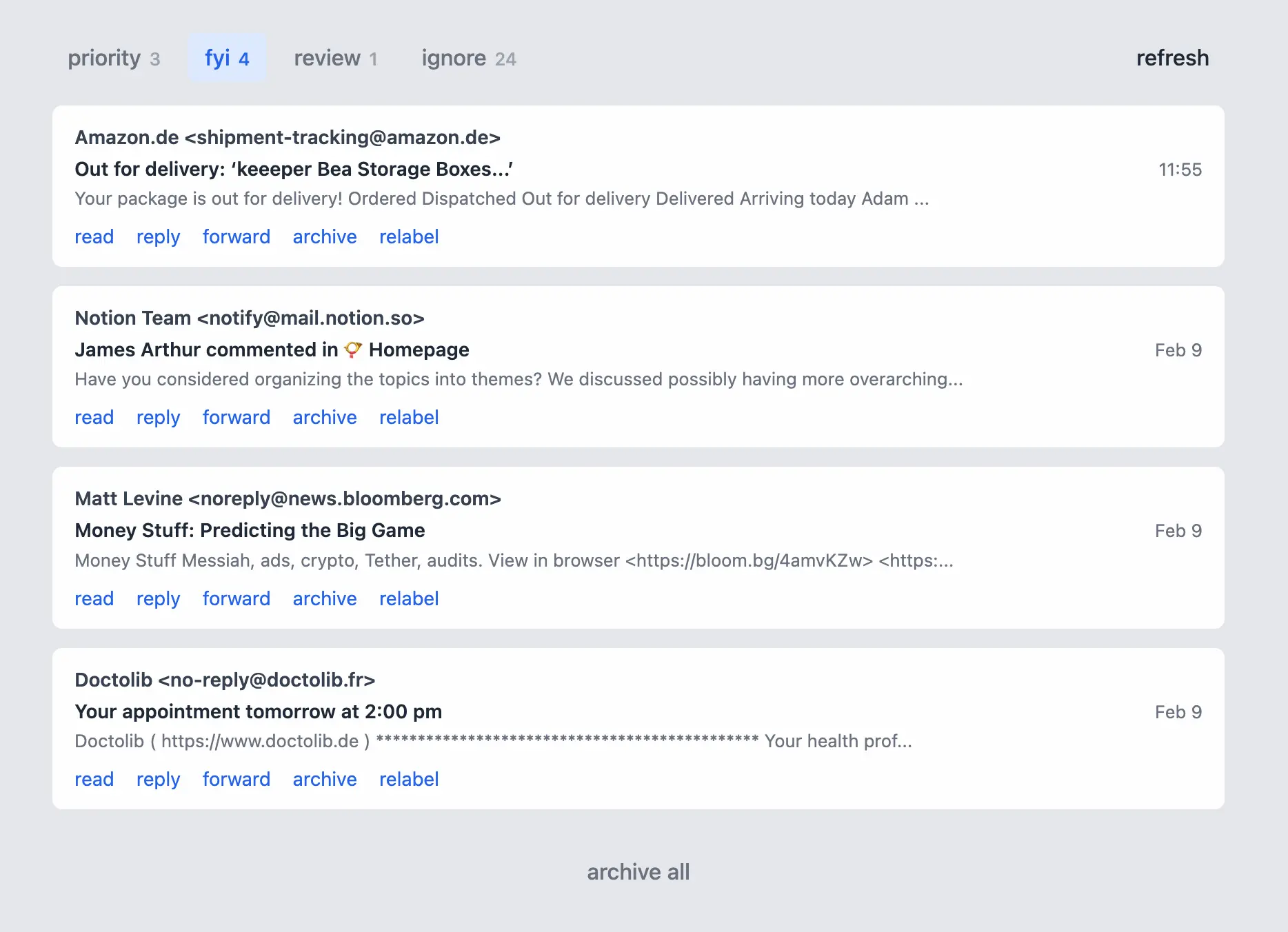
I can't do much on this screen, by design. The most important feature are the priority/fyi/review/ignore categories, assigned by the algorithm.
The software fetches messages from all my email accounts automatically in the background and runs them through my ML pipeline. For each it computes an embedding and features, then runs against a classifier model to predict one of three labels (priority, FYI, or ignore). If the prediction is not above a certain confidence level, it goes to "review."
If an email's label is wrong, I click "relabel" and choose the correct one—a cue for the algorithm in the future. If I want to read in more depth or reply/forward, those links are deeplinks through to the appropriate service (Fastmail or Gmail). When I'm done, I can archive individual messages or all in a category.
I've used this for all my email triage for two weeks, and it's working great (with a few caveats). Breaking down the details...
Stats
Before any real-world use, I hand-labeled ~350 emails as a "golden set" to train and evaluate an initial model. The following stats are what happened after that, e.g. once I was fetching and processing email as my primary inbox tool in daily use.
All the label predictions and subsequent actions (label/relabel being the most important) are added to an append-only log, so I can track how it's doing in the real world. These are similar to the output from the evals, but in this case it's my real-life usage that is the evaluation.
Here's results from 12 days of use:
572 email label prediction attempts
439 confident, 133 sent to review = 77% coverage
8/439 relabeled = 1.8% errors = 98.2% accuracy on confident
97/133 review emails labeled = 73% resolved

Overall correct: 431/572 = 75%
Accuracy is nearly perfect (98%) when confident, but the algorithm is too shy at making predictions (77% coverage). I've already tuned the threshold for confidence so I hope to get something closer to 95% accuracy / 90% coverage going forward.
I've found the algorithm is also quick to correct itself. When I get email that's miscategorized, I relabel it. And the next email like that one (after retraining) gets labeled correctly. The classifier only needs one example, which makes me happy.
I'm currently retraining the model manually once or twice a week, when there are enough results from resolved reviews or relabel events. But training the model is extremely quick and cheap, so this could fire automatically once a day, after every N samples, or even after every relabel.
Vibes: "You've got mail"
How did I feel using this? Let's start with the positive.
- I love the fact that my priority inbox is now only things that are directly relevant to my life. I feel a thrill of excitement when I see a new message there, reminiscent to me of the 1990s when email was new and shiny and every message in your inbox was correspondence from a friend or colleague. I only get two or three priority messages per day (from 50 or so total emails). Anecdotally, I think I was faster to respond to priority emails since I'm not spending mental bandwidth on triaging my inbox at the same time.
- It was cathartic to go into my Fastmail and Gmail filters and delete over a decade of accumulated attempts to solve this problem with manual rules. Looking through these made more clear that (1) this is a problem that's been causing me pain for a long time and (2) all the effort that I put into manual filtering didn't get anywhere near to solving the problem decisively.
- The app is local-only and my dataset+models are in my desktop web browser, so there's no phone app to check. (I might implement one later, by syncing the messages and models with Automerge or other sync engine.) I found this turned off my compulsive "check emails in bored moments of regular life" e.g. while waiting in line at the airport. Checking email is now an event I do twice a day, and after that I feel confident there's nothing I'm missing out on.
Vibes: annoying homework
On the negative side of the experience:
- I felt vaguely annoyed by the "homework" created for me with the review tab. It was fine when there was one or two messages there, especially where they were legitimate edge cases. But sometimes there would be 10+ messages landing in review, which felt like the system was pushing its job onto me.
- Only 8 out of 439 messages were mis-labeled, which is excellent. Even so, a few times I felt a flare of irrational anger when something was mislabeled. "You put this important message into FYI, how dare you!?" or "Why is this nonsense not going to ignore!?"
Both are minor, but I paid attention because future users would probably feel them more acutely.
Takeaways
The triage system in Firehose really works and is a genuine improvement my quality of life. I spend less time checking email, less time tuning filters, and respond more proactively to important emails.
But this leads to my next question: if this works so well, why aren't existing products doing this? Superhuman, Fastmail, Gmail, Spark, Sanebox, and probably many others are well-positioned to add something like this. After all, my ML pipeline is not particularly sophisticated or expensive.
Some hunches:
- The "homework problem" described above might be much worse in practice for end users who aren't motivated to invest in their email triage systems, even if it will save them time in the medium term.
- This is particularly acute for onboarding. Who wants to spend half an hour labeling hundreds of emails initially before seeing if the system will work for them?
- It's probably too specific to my workflow (e.g. priority, fyi, and ignore). People have infinite variety in how they want to sort and process their messages, so maybe this whole approach doesn't generalize.
I also had the chance to demo and do some light user testing with Ink & Switch during a team summit. Based on this, I can see that any message triage tool will need to overcome some significant trust/privacy hurdles. Local-only or local-first goes a long way to help with that, but so far I don't have a pure-browser embeddings solution.
Up next
I'll continue using Firehose to triage my email. But now it's time to expand to a new source!
Whatsapp and Discord are two top candidates, since these are places where I frequently receive important/actionable messages. Each in their own way are noisy, and control over notifications in the native apps for each are pretty limited.
I anticipate both of these services will have the "adversarial API" problem. That is: building a third-party client to read and route messages is a gray area in their terms of service, and perhaps only partially supported in their API surfaces.
I also recently saw the DoNotNotify project, which proxies notifications on Android devices. This would be another interesting place to hook up as a source. On iOS it doesn't seem possible to proxy notifications, but you can use CallKit to triage incoming calls which would be another interesting application.
Overall I'm heartened by the success of email triage and cautiously optimistic about the ability to map it to other message sources.